Microsoft Copilot Cowork has arrived – should your business be using it?
Microsoft has officially launched Copilot Cowork, a new capability for Copilot that goes beyond answering questions and drafting. In fact it can complete entire pieces of work, take actions and develop tools on your behalf.
Unlike Microsoft 365 Copilot, which helps you create documents, emails or analyse data while you work, Copilot Cowork can be given an objective and then independently carry out a series of tasks across your Microsoft 365 environment.
There is a lot of hype around Cowork. The Pro Drive team has been using Cowork for months and we can confirm it lives up to it. Here’s what you need to know..
How is it different to Microsoft 365 Copilot?
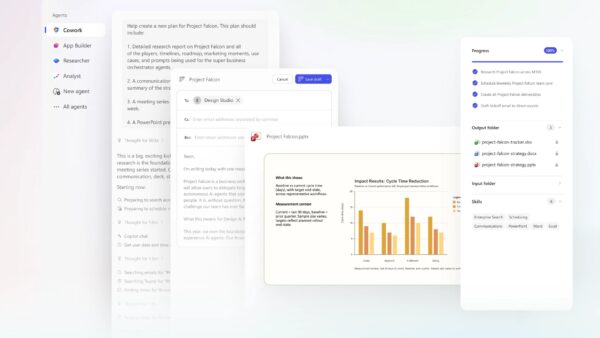
Think of it as the difference between asking someone for advice and delegating a job for them to do. It works similarly to an agent but can be initiated from a single prompt without any agent building knowledge. For example, you could ask Cowork to:
- Prepare tomorrow’s client meeting by reviewing emails, Teams chats and documents.
- Analyse several spreadsheets and create an interactive management dashboard in your branding.
- Research a topic, draft a proposal and prepare the supporting presentation.
- Carry out supplier risk assessments when they are due, use website information to complete the risk assessment then draft an email to the contact for the missing information.
It continues working in Microsoft’s cloud, even after you’ve closed your laptop.
How is it different from Claude Cowork?
Both products are built using Anthropic’s Cowork technology, but Microsoft Copilot Cowork works inside your Microsoft 365 tenant, using your existing permissions, SharePoint, Teams, Outlook and Microsoft Graph. That makes it a much more natural fit for organisations already invested in Microsoft 365.
Another important difference is that as Microsoft Copilot Cowork works inside your Microsoft 365, the activity is recorded in the compliance log, including details of prompts submitted (subject to the correct licensing). Furthermore as there is no desktop application, the risk from a cyber attacker using techniques such as ‘prompt injections’ to compromise your PC is lower.
What should you consider first?
Before enabling Cowork, organisations should review:
- Information governance and who can delegate work to AI.
- Whether sensitive information may be processed outside your preferred data region for certain AI workloads (Cowork uses Anthropic models based in the US)
- Appropriate security controls, auditing and user training.
- Cost management to avoid unexpected bills from AI consumption.
These considerations are particularly important for regulated firms such as law firms, accountants and financial services businesses.
Understanding the costs
Cowork requires a Microsoft 365 Copilot licence and introduces a second element: usage based billing.
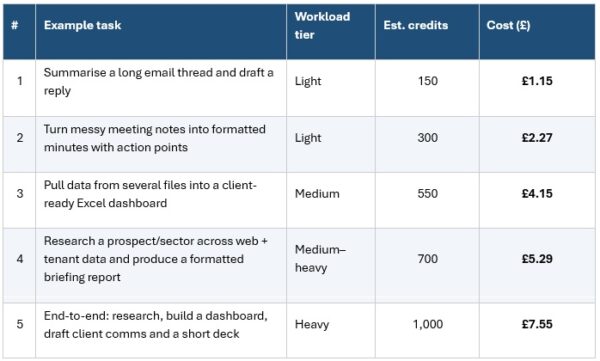
Charges are based on Copilot Credits, with the amount consumed depending on factors such as the AI model used, how much organisational data is analysed, the number of tools called and how long the task runs. These credits can be prepaid or pay as you go.
Microsoft provides a Cowork Cost Estimator which can be used to work out expected spend on Cowork. Some typical examples from the real word are:
How Pro Drive IT can help
Copilot Cowork is incredibly powerful, but like any new technology, it delivers the best results when introduced with the right management and governance.
At Pro Drive IT we help organisations:
- Identify the best business use cases.
- Demonstrate real-world scenarios for your teams.
- Implement security and compliance safeguards.
- Put sensible cost controls in place before rollout.
- Train your staff to use Cowork and other Microsoft AI tools
If you’re wondering whether Copilot Cowork could save your business hours every week, get in touch with our team for a demo.