If your firm already uses multi-factor authentication (MFA) and a managed password approach, you’re ahead of many organisations. However cyber attackers are still stealing passwords and intercepting one time codes. The UK National Cyber Security Centre is explicit that passkeys are the direction of travel and recommends using passkeys wherever they are offered, instead of passwords see National Cyber Security Centre guidance on passkeys.
 That matters if you’re in legal, accountancy, or wider professional services: you hold confidential client data and your reputation depends on trustworthy access controls. Passkeys are not a fad; they continue the shift we’ve already described toward stronger factors than passwords alone with fewer reusable secrets for criminals to phish, and signins anchored to what your device can prove cryptographically, not something an attacker can copy from an email.
What is a passkey?
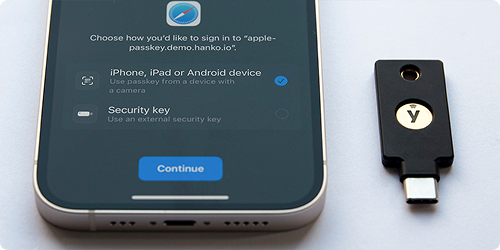
A passkey is a secure credential stored and managed for you typically by your device’s credential manager (often called a password manager, but it handles passkeys too). You don’t memorise it. When you sign in to a supporting website or app, you approve access using what you already use to unlock your device: Face ID, fingerprint, or a strong device PIN.
The National Cyber Security Centre summarises three practical advantages: security, speed, and resilience.
- Stronger than typical password with multifactor codes. Passkeys are phishing-resistant in a way passwords are not: they aren’t something you can type into a fake site, or reuse after a breach, in the same way as a password. NCSC technical analysis concludes passkeys are at least as strong as the best “password + second step” setups when implemented well.
- Faster. Passkey sign in can be dramatically quicker than typing a password and waiting for a separate second factor. This makes a difference for busy fee-earners and support staff.
- Less to go wrong. You’re not juggling a unique memorised password for every passkey enabled service; the device and platform handle the hard part. That reduces password fatigue and friction while moving toward phishing resistant authentication, the sort of control baseline regulators and insurers increasingly expect.
Microsoft has published consumer programme metrics on passkeys: completion rates when users start enrolment, sign-in faster and more successful than password-based paths in their measurements, and user experience patterns that prioritise passkeys when available. These together support the point that passkeys are meant to be lived with, not only “more secure on paper.” Full detail and methodology sit in one place: Microsoft Security Blog, 12 December 2024 — passkey UX and adoption. If your firm runs on Microsoft 365, that direction matches the wider Microsoft 365 and Entra ecosystem many organisations use for email, files, and collaboration.
What to do next
This isn’t a mandate to rip everything out overnight. A sensible path for any organisation tightening authentication is:
- Say yes when trustworthy services invite you to add a passkey. Consumer Microsoft accounts and many major platforms now surface prompts after sign-in or password reset; taking a few minutes when prompted is often the easiest win.
- Keep doing the basics everywhere else. Where passkeys aren’t available, keep unique strong passwords (ideally from your password manager) and multi factor authentication on critical accounts, especially email, as described under “If passkeys aren’t available” on the NCSC passkeys guidance linked above.
- Get expert input before changing firm-wide identity policy. Central policies for Entra ID, Conditional Access, device compliance, and third-party apps should stay coordinated so passkeys and MFA work consistently across PCs and mobiles (Mobile device management and Mobile application management are typical control points).
Bottom line
Passkeys are the way forward: they’re more secure against phishing, less hassle than juggling passwords and codes, and they align with NCSC recommendations and Microsoft’s product trajectory for how UK professional firms authenticate.
If you’re unsure whether a prompt is genuine, or how passkeys should fit alongside Microsoft 365 and your line-of-business apps, we’re happy to help. Call us 0330 124 3599, email hello@prodriveit.co.uk, or use prodriveit.co.uk/contact (.